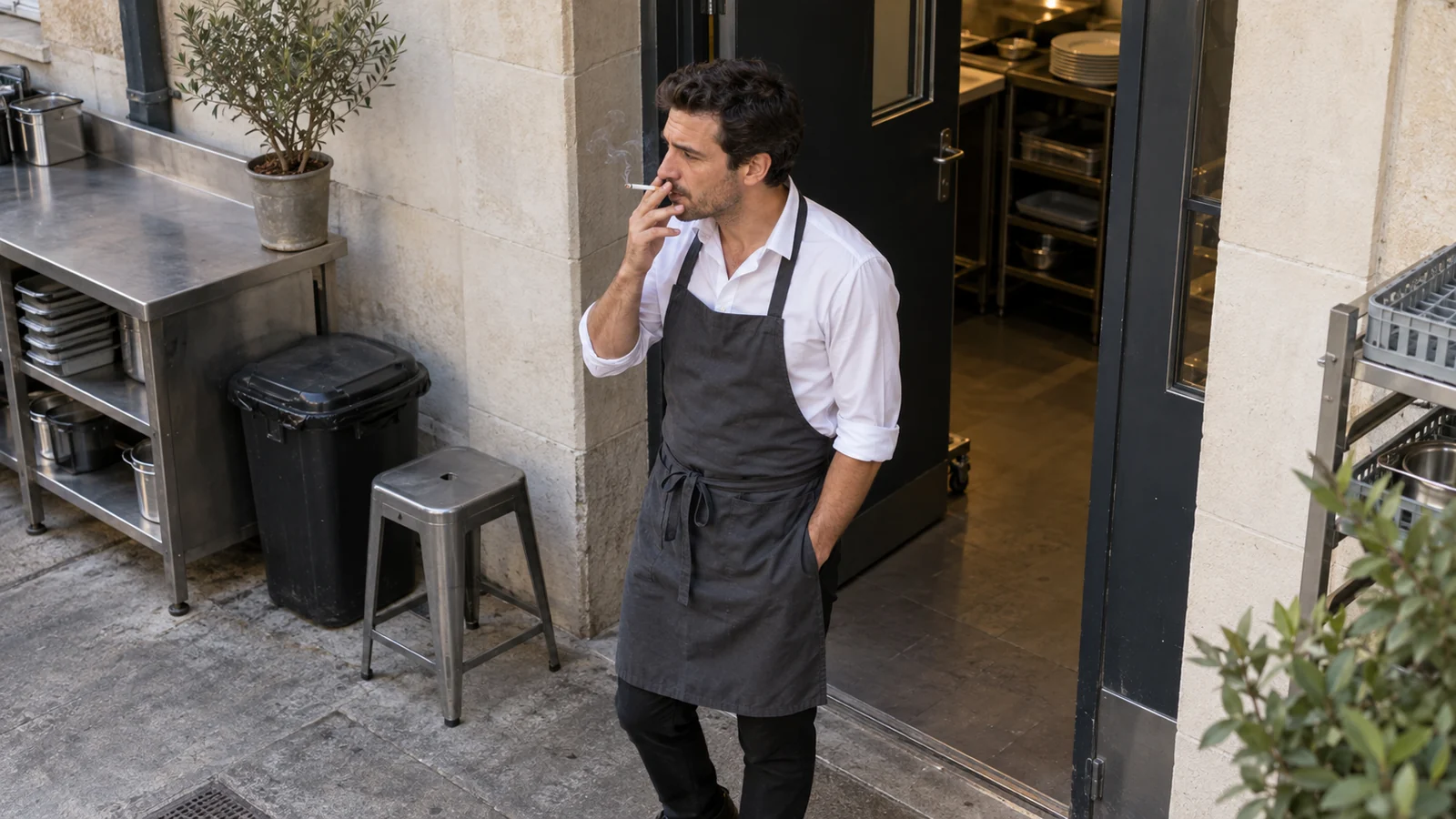
Smoking by the service entrance
A waiter is holding a cigarette near the service entrance.
Check the location and the site’s smoking policy before deciding on a follow-up.
Review the context, then record your next step.
VLM video search / From language to action
Your video assistant.
Ask in any language.
A chat assistant powered by a vision-language model connects your question to the event. Speech-to-Text turns a spoken request into a search - and a smart alert ready for review.
Video intelligence“Show the waiter smoking.”
The relevant scene, with the context to decide what happens next.
Speak or type. Find the context. Review the event.
For retail, hospitality & multi-site operationsLanguage in. Context out.
Smoking by an entrance. A conversation at a workstation. Water on a kitchen floor. Bring the relevant event into one focused review.
Try one of these three searches.

A waiter is holding a cigarette near the service entrance.
Check the location and the site’s smoking policy before deciding on a follow-up.
Review the context, then record your next step.

Show the waiter smoking.
We connect the VLM model, Speech-to-Text and your event workflow - with the camera coverage, languages and alert rules agreed for your pilot.
Connected workforce analytics
Add attendance, site occupancy and shift review to your video intelligence workspace. Give operations, HR and site teams a shared view.
Put missing punches, employee corrections and supporting records in one review flow.
Use estimated zone occupancy and time-of-day patterns to plan coverage and investigate bottlenecks.
Give every exception an owner, a next step and a visible decision trail.
The product experience
From a busy zone to a missing clock-out. Give your team the evidence and a clear path to resolve it.
Choose an industry. Try a review.Store 014Sample day · 08:00–15:00
Connect queue peaks with a manager’s staffing review.
Site demand
| Time | People | Threshold |
|---|---|---|
| 08:00 | 3 | 12 |
| 09:00 | 5 | 12 |
| 10:00 | 9 | 12 |
| 11:00 | 14 | 12 |
| 12:00 | 17 | 12 |
| 13:00 | 11 | 12 |
| 14:00 | 13 | 12 |
| 15:00 | 8 | 12 |

From evidence to action
Choose an event. Check the record.
Log the next step.
Attendance records and zone signals stay distinct.
The scheduled shift ended at 14:00, but the kiosk has no clock-out. Ask for confirmation before any timecard adjustment.
Shift R-042Choose what you checked or what is still missing.
No timecard or pay is changed in this workspace.
Your first decision will appear here with the event, reason and reviewer.
Site groups, zones, shifts, review roles and reporting - configured around your business during the pilot.
Use cases
Three ways to put presence data to work. Choose the workflow that fits your sites.

01 / Retail
Compare customer-area occupancy patterns with planned coverage. Bring recorded check-ins and unresolved time records into the same manager workspace.
Review coverage before the afternoon peak.

02 / Warehouses
Bring entrance check-ins, shift records and zone counts into one view. Surface missing punches and camera outages with enough context for a supervisor to act.
Resolve a missing clock-out before payroll review.

03 / Service sites
Give local leads a focused view of expected shifts and outstanding reviews. Share agreed site-level summaries with account teams through your CRM.
Close a site-record question before the client report.
The business case / Your assumptions
Make the next investment decision with a clear view of the numbers. Model your review workload, test a target and include the cost of delivery.
Your inputs
Start with your current process. Validate review time and delivery costs in the pilot.
Monthly capacity value after operating cost
| Month | Capacity value |
|---|---|
| Start / setup | -$3,000 |
| 3 | $2,400 |
| 6 | $7,800 |
| 9 | $13,200 |
| 12 | $18,600 |
Sites × cases per site × (current minutes − target minutes) ÷ 60 × hourly cost. Subtract operating costs for monthly net value, then subtract setup cost from the twelve-month total.
Setup cost ÷ monthly net capacity value. The model holds workload and review times constant. It values time that could be reassigned; it does not assume cash savings, reduced headcount or new revenue.
A connected workflow
Attendance and payroll rules stay in your workforce or HR system. Camera observations add operational context.
Badge, PIN or kiosk. Keep the source and timestamp of the attendance event.
Estimate people in agreed zones and surface missing data. Occupancy does not identify employees or establish paid hours.
Managers review corrections and record a reason. Employees have a route to question or correct a record.
Approved time goes through your workforce process. CRM receives agreed site-level summaries.
Fit the systems you use
Camera suitability, APIs, exports and permissions are assessed during discovery. Every connection is scoped for your selected systems.
A practical first implementation
A defined pilot gives your operations, HR and IT teams evidence for the next investment decision.
Define the events you want to find, your teams’ languages, camera coverage and review rules. Map the systems and access boundaries.
Connect speech-to-text, VLM search and the Smart Event review journey. Configure the agreed camera sources, zones and system interfaces.
Test multilingual requests against reference footage. Measure relevant matches, missed events, false alerts and the time needed to check a result.
Compare search quality, review effort and operating costs. Use the findings to decide which events and locations to roll out next.
A scoped VLM search and review workspace, a data and integration map, a working pilot, test findings and a rollout recommendation.
Site count, timeline, hosting and acceptance measures are agreed after discovery. Privacy, retention and local requirements are planned with your HR, IT and privacy leads.
We use camera counts as estimates, explicit check-ins as attendance events and human review for corrections. Reference documentation: Axis zone analytics, Odoo attendance kiosks and ICO guidance on monitoring workers. These sources inform the attendance and occupancy workflow; they do not imply partnerships or certified integrations.
A few useful answers
The vision-language model connects a natural-language request with what is visible in your camera footage. It helps find relevant Smart Events for review, from smoking near a staff entrance to water leaking in a kitchen.
Ask in your own language, by text or voice. Speech-to-text turns a spoken request into text, and the VLM finds the relevant event. We validate recognition, terminology and search quality for your teams’ languages during the pilot.
Open the matched event, inspect the footage and review the context before taking action. A conversation is an observed event; deciding whether it relates to work requires the task and shift context.
Possibly. We check the camera models, access to streams or analytics events, field of view, lighting and coverage. The pilot tests suitability in your actual conditions.
Camera observations can support occupancy analysis and an authorized review. Paid time depends on explicit attendance records, shift rules, breaks, corrections and your approval process.
The proposed baseline uses badge, PIN or kiosk check-ins and zone counts without identity matching. A biometric option would require a separately justified scope and assessment.
We assess APIs, exports and permissions during discovery. Attendance and approvals stay in the selected workforce or HR system; CRM receives the site-level summaries agreed for your use case.
The proposed workflow marks the affected period as a data gap and routes it for review where relevant. An unavailable camera does not become evidence that someone was absent.
Explore the interactive demo, then define the screens, integrations and operating rules for your sites during the pilot.
Agree a baseline and acceptance measures first. Compare review time, unresolved records, data quality and full operating costs, then decide whether to scale, change the approach or stop.

Start with the events that matter
Tell us what you want to find, the languages your team uses, your camera setup and the systems you want to connect.
Plan your VLM pilotA focused brief. An agreed scope. A measurable first step.